Chart of accounts built to fit
Accounts with the right detail type so QuickBooks reports map correctly, sub-accounts where a rollup genuinely helps, numbering switched on if your accountant wants it, and duplicate accounts merged out.

We run your QuickBooks Online file end to end: bank feeds and rules, categorisation, reconciliation and a closed month by the 10th, with A/R, A/P and commentary on Growth and above. You keep the primary admin login and the subscription, we work inside it as an invited accountant user, and an ACCA-qualified accountant reviews the close before it reaches you.
If the file is already in trouble, that is a separate, quoted piece of work rather than something we quietly absorb. Cleanup first, monthly rhythm afterwards.
Or run a health scan on an illustrative QuickBooks file first.
None of these stop QuickBooks working. They stop the numbers being true, which is worse, because the file still looks finished.
Payments went in twice: once from the invoice, once from the bank feed. Revenue is overstated and nothing ever cleared the holding account.
It has sat on the balance sheet since the file was created. Nobody closed it out, and nobody can say what is inside it.
A CSV import ran over a connected feed, or the bank was reconnected and QuickBooks pulled the history in again. Expenses are double-counted.
Someone made the difference go away with a reconciliation adjustment. The month shows as reconciled and the error is parked in a discrepancies account.
Nobody reviews them. A rule that was slightly too broad has been coding every marketplace purchase to one account for six months, laptops and stationery alike.
Miscellaneous, Misc Expense and Other are all in use. The profit and loss is technically correct and completely unreadable.
Run the scan on an illustrative QuickBooks Online file. It works through the checks we make on a real file, flags what it finds, then fixes each one in the order we would. The file only counts as reconciled when the difference to the bank statement is zero without an adjustment.
Illustrative file and figures. Nothing is connected and nothing is sent.
Every account agrees to its statement without an adjustment, and the closing date password keeps it that way.
Illustrative file and figures
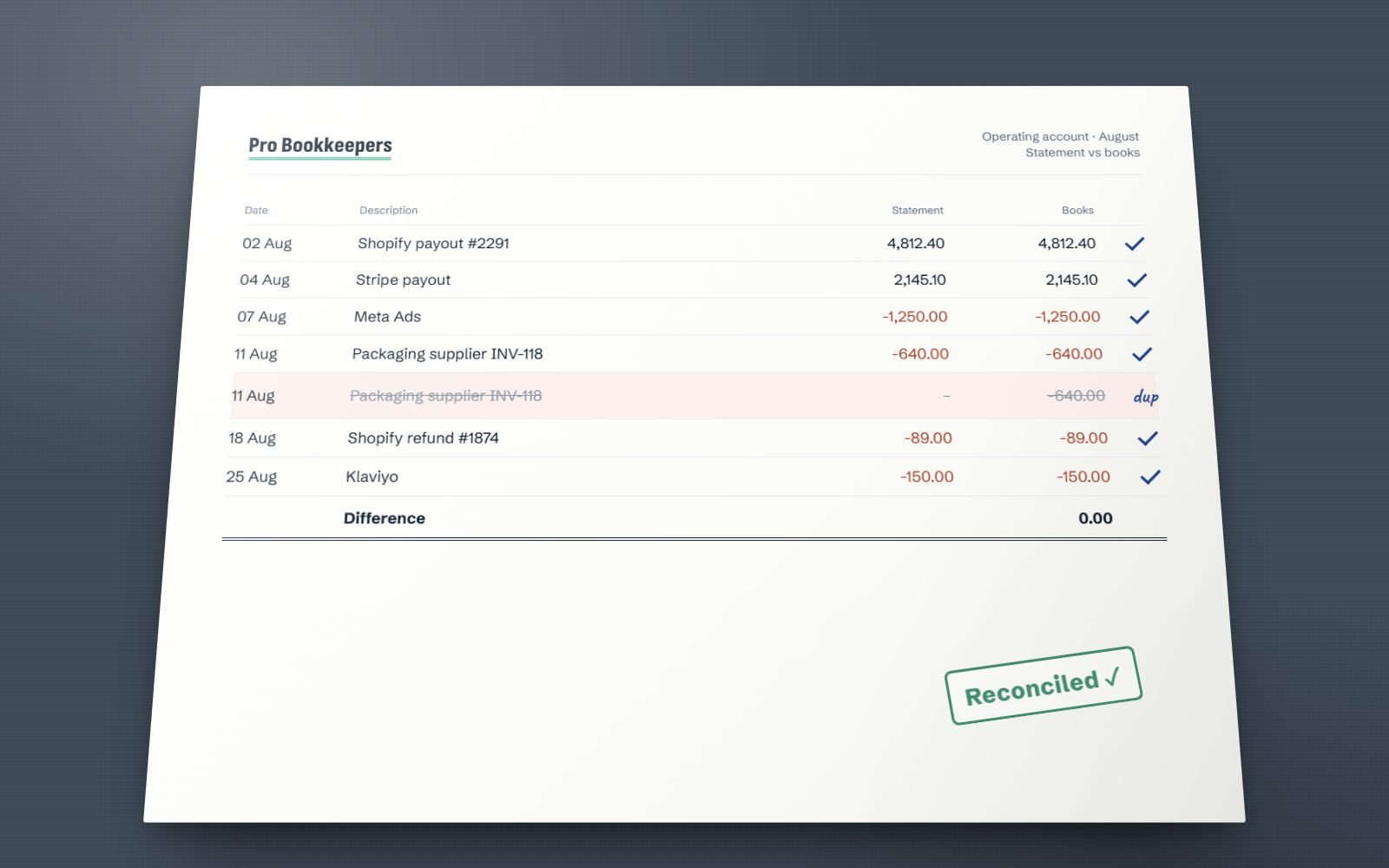
Not a green button pressed until the software agrees. Each transaction is matched to the bank statement, duplicates are found and removed, and the difference is 0.00 before the month closes.
Concrete deliverables, not activity. Every item below is something you can open in QuickBooks and check for yourself.
Accounts with the right detail type so QuickBooks reports map correctly, sub-accounts where a rollup genuinely helps, numbering switched on if your accountant wants it, and duplicate accounts merged out.
Every feed connected and monitored, so a silent disconnection never passes for a clean month. Rules written for the repeating transactions, auto-add left off, and the rule set reviewed quarterly.
Bank, credit card, loan, PayPal, Stripe and merchant accounts reconciled against the real statement, not the feed balance. The discrepancy report is run and cleared, never adjusted away.
Invoices raised, Receive Payment applied against the invoice it settles, deposits grouped so the bank line matches. Aged receivables reviewed monthly, old invoices chased or written off on your instruction.
Bills entered against the right vendor and date, vendor credits applied, payments recorded so aged payables reflects what you actually owe. 1099 vendors flagged and their totals tracked through the year.
Accruals, prepayments, depreciation, a balance sheet reviewed line by line, a closing date password set, then the profit and loss and balance sheet, plus a statement of cash flows and written commentary on Growth and above.
Scope depends on plan: Essentials reconciles up to 2 bank or card accounts, and A/R and A/P start on Growth. See pricing below.
Most struggling QuickBooks files do not have a bookkeeping problem. They have a structure problem: a chart of accounts that grew one transaction at a time, because nobody decided in advance what the profit and loss was supposed to show.
We build it backwards from the reports you need. Direct costs separated from overheads so gross margin means something. Detail types set correctly, because QuickBooks uses them to decide where a line lands on its own statements. Sub-accounts where a rollup is genuinely useful and nowhere else, since three levels of nesting reads worse than one.
Products and services get the same treatment. Each item points at a specific income account, and anything you buy to resell points at a cost of goods account as well. Get that mapping wrong once and every invoice raised afterwards repeats the mistake silently.
Then classes and locations, if departmental reporting matters to you. Classes are switched on in Account and Settings, and the warning for unclassed transactions is switched on with them. Without that warning, a class report is a guess.
QuickBooks lets you edit a transaction inside a reconciled period. It warns you, lets you do it anyway, and the reconciled balance quietly stops matching the statement. Nobody notices until next month's reconciliation opens with a difference. That single behaviour sits behind most of the reconciliation damage we see.
The Reconciliation Discrepancy report is the first place we go. It lists exactly which reconciled transactions were later changed, deleted or re-dated, and by whom. Nine times out of ten the fix is one transaction restored, not a month torn down.
When a full undo is justified, order matters. Accountant Tools un-reconciles an entire month at a time, so we work backwards from the most recent month to the first bad one, then re-reconcile forward against real statements. If a prior year is in scope we tell you before we start, because your accountant may already have filed from those figures.
Afterwards the closing date password goes on. It is the cheapest control in QuickBooks and almost nobody uses it.
A month is reconciled when the closing balance agrees to the bank statement and the difference is zero without an adjustment. A reconciliation adjustment is not a fix. It is an error moved into an expense account where nobody will ever look at it again.
Each one is fixable. None of them fixes itself, and all three get more expensive the longer the file runs on top of them.
Payments are received against invoices, then the matching bank deposit is added as fresh income instead of matched to them. Revenue is counted twice and the holding account grows forever. We match each item back to the deposit it belongs to, remove the duplicates, and reverse payments that were never actually received.
The plug account from setup, still on the balance sheet years later. We take it apart component by component: opening bank balances, unrecorded loans, owner contributions, prior-year retained earnings. Each goes where it belongs and only the genuine residual moves to Retained Earnings.
A CSV upload run over a live feed, or a bank reconnected and history pulled in again. The register holds the same transaction twice, expenses are overstated and nothing reconciles. We identify the duplicate set by date range and source, remove one side, and reconcile the affected months again from statements.
Inventory, if you carry it. QuickBooks Online costs inventory on FIFO only, on Plus and Advanced. It does not apply landed costs automatically, it has no bill of materials assembly on Plus, and it permits negative quantities that quietly corrupt cost of goods sold. We will tell you honestly when a dedicated inventory app feeding summarised journals into QuickBooks is the better answer than stretching QuickBooks to do it.
Four steps. You see the diagnosis and the fixed number before anything in your file changes.
You send an accountant user invite from Manage Users. We look, we do not touch. Balance sheet, profit and loss by month, audit log, reconciliation history.
One page listing what is wrong, what fixing it takes, the one-off cleanup fee if you need one, and the monthly fee that follows it.
Cleanup runs oldest month forward. Feeds reconnected, rules rewritten, holding accounts emptied, opening balances proved against a trial balance.
Closed by the 10th, reviewed, closing date password set, reports sent (with commentary on Growth and above), plus a short list of anything needing a decision from you.
Fixed monthly if your bookkeeping is steady. Hourly or a dedicated resource if the workload varies, or you want a named person working set hours inside your own QuickBooks file. Cleanup is always quoted separately as a one-off.
Sole traders and early-stage businesses on QuickBooks Simple Start or Essentials.
Established businesses on QuickBooks Plus, with payroll and real monthly decisions.
Multi-entity, inventory or e-commerce files on QuickBooks Plus or Advanced.
Prefer a named person on hours? A bookkeeper is $14/hr or $1,650 a month full-time, a senior bookkeeper $20/hr or $2,400, an ACCA accountant $28/hr or $3,600. See the full pricing table.
Offshore bookkeeping only works if the access model is boringly safe. Here is ours.
You invite us as an accountant user, or a standard user with limited access. You stay primary admin, the subscription stays in your name, and you can revoke us in about thirty seconds.
We do not ask for online banking credentials, and you should refuse any bookkeeper who does. Feeds are authorised by you, directly with your bank, through the QuickBooks connection flow.
Every change we make is stamped with our name, the date and the before-and-after values. Check any of it, any time. A full export leaves with you if you leave, with no exit fee.
If QuickBooks is not the right fit, or the backlog is the real problem, start here instead.
The same service, run in Xero. Bank rules, the reconcile screen, tracking categories and a close by the 10th.
Xero bookkeeping servicesMonths or years behind. Rebuilt oldest month forward, at a one-off fixed fee agreed before we start.
Catch-up and clean-upShopify, Amazon and Stripe payouts broken out into revenue, fees and refunds instead of one net deposit.
E-commerce bookkeepingWe use both daily. Where each genuinely wins, where each quietly frustrates, and which to choose for your business.
Read the comparisonThe exact checklist we work through before any set of accounts is signed off. It works whether you outsource or not.
Read the checklistThe errors that cost small businesses most, and the QuickBooks habits that stop each one from recurring.
Read the articleAlso available: payroll services, or see every service we offer.
More than categorising the bank feed, which is the part most people picture. On a Growth file, a normal month looks like this: we review every transaction QuickBooks pulled in and code it against your chart of accounts, match customer payments to the invoices they settle so nothing lands in Undeposited Funds and stays there, enter and schedule bills, and reconcile every bank, credit card, loan and merchant account against the actual statement rather than against the feed balance.
Then comes the part that makes it a close rather than data entry: accruals and prepayments where they change the picture, depreciation, a line-by-line look at the balance sheet to see whether each balance can be proved, and a review of the profit and loss against the previous two months to catch coding that has drifted. When it is right we set the closing date password, produce the profit and loss, balance sheet and statement of cash flows, and send a short note on what moved and why. Books are closed by the 10th. On Essentials the scope is narrower: up to 2 bank or card accounts reconciled and a profit and loss and balance sheet, without A/R, A/P, the cash flow statement or the written note.
No. We ask you to invite us as an accountant user from Manage Users in QuickBooks Online, or as a standard user with whatever access you are comfortable giving. You stay the primary admin, the subscription stays in your name and on your card, and you can remove our access in about thirty seconds without asking anyone.
We also never ask for online banking credentials. Bank feeds are authorised by you, directly with your bank through the QuickBooks connection flow, and if a feed needs reconnecting we tell you and you click it. Any bookkeeper who asks for your bank password or your QuickBooks primary admin login is asking for more than the work requires. There is a side benefit to the accountant user route: every action we take is stamped in the QuickBooks audit log with our name, the date and the before-and-after values, so our work is inspectable by you at any time without you having to take our word for anything.
Yes, and it is quoted as a separate one-off fixed fee rather than folded into a monthly price. The first step is a diagnostic: we open the file, run the balance sheet, the profit and loss by month and the audit log, and list what is actually wrong. Duplicated feed imports, an Opening Balance Equity balance nobody ever closed out, Undeposited Funds that has been growing for two years, reconciliations forced shut with an adjustment, expenses coded to whichever account was closest alphabetically. You get that list and a fixed number before we touch anything.
Then we work oldest month forward, because repairing the current month on top of a broken prior year just moves the problem. Where bank feeds no longer reach back far enough, and QuickBooks feeds usually pull only recent history, we work from statements instead. At the end you have a file where every balance sheet line can be proved with a schedule, plus a written note on the judgement calls we made so your accountant can follow them. The full method is in our guide to catching up 12 months of bookkeeping.
Undeposited Funds is a holding account and it is meant to be temporary. You receive a payment against an invoice, it sits in Undeposited Funds, and when the money lands you create a Bank Deposit that groups those payments into the single line that actually hit your account. The balance clears.
It grows when that second half never happens, usually because the deposit on the bank feed was added as new income instead of matched to the payments already waiting. That counts the revenue twice: once on the invoice, once on the feed line. We clear it by opening the account, matching each item back to the real deposit it belongs to, removing the duplicate income entries, and reversing any payment that was never genuinely received so the invoice goes back to open. After the fix, the routine matters more than the repair: if you take card or platform payments, grouping deposits has to be part of the weekly rhythm rather than something attempted in a panic at year-end.
Opening Balance Equity is the plug account QuickBooks uses during setup. When you enter an opening balance on a bank account, or import a trial balance that does not balance, QuickBooks posts the difference there so the file still balances. It is supposed to be emptied as the last step of setting the file up. In practice it sits on the balance sheet for years, and because most owners never read the balance sheet, nobody notices.
Clearing it properly is not a matter of writing one journal to make it disappear. We work out what each component actually was: a genuine opening bank balance, an unrecorded loan, money the owner put in, a prior-year retained earnings figure that was never brought across. Each piece is reclassified to the account it belongs in, and only the true prior-period residual moves to Retained Earnings. If the file's opening position was never agreed to a prior-year trial balance we say so, because an Opening Balance Equity balance is often the visible symptom of a setup that was never finished.
Yes, with an accountant user. In QuickBooks Online the Undo option sits under Accountant Tools, in the history list on the Reconcile screen, and it un-reconciles a whole month at once. There is no partial undo, which is exactly why it is not a routine tool. Most of the time the right move is smaller: run the Reconciliation Discrepancy report, find the transaction that was edited, deleted or re-dated after the month was closed, and correct that one thing.
A full undo is warranted when the reconciliation was never real in the first place, typically when someone forced it shut with a reconciliation adjustment to make the difference go away, which simply parks the error in a discrepancies expense account. When we do undo, we work from the most recent month backwards to the first bad one, re-reconcile forward against the actual statements, and then set a closing date password so the period cannot be edited again without it. If a prior year is involved we tell you first, because it can change figures your accountant has already used.
We switch auto-add off on almost every file we take over. Bank rules themselves are genuinely useful. A rule that codes your monthly software subscription, your rent or your merchant fees saves real time, and QuickBooks can match on vendor, amount, description or the raw bank text.
The problem is the automatic-add switch, which posts the transaction straight into the register with nobody looking at it. The day a rule is slightly too broad, it starts silently miscoding. The classic case is a rule on a large retailer or marketplace: it correctly catches the $40 of stationery and it also catches the $1,200 laptop, and both land in office supplies. By the time anyone reads the profit and loss there are six months of it to unpick. Our rhythm is rules on, auto-add off. QuickBooks suggests the category, a person confirms it, and anything that does not fit the pattern gets stopped. We review the whole rule set at least quarterly and delete the ones that have stopped matching reality.
Classes and locations are the way to slice one company's numbers without splitting the file. A class is usually the thing you want a profit and loss for: a service line, a department, a project type. A location is usually a place or a trading name. Both are switched on in Account and Settings under Advanced, and both only work if they are enforced, because the setting that warns you when a transaction has no class is the difference between real departmental reporting and a report with a large unspecified column.
Use separate QuickBooks companies when the entities are genuinely separate legal entities with their own bank accounts, their own filings and their own balance sheets. Do not split files just to see two sides of one business, or you will be reconciling intercompany balances forever for reporting you could have had from classes. One practical note: class and location tracking is a Plus and Advanced feature, so on Simple Start or Essentials the real question is whether the reporting justifies the upgrade.
QuickBooks Online tracks inventory on Plus and Advanced, and it costs on FIFO only. There is no average cost and no LIFO option in QuickBooks Online. For a business buying and selling finished goods with straightforward purchase costs, it works well enough.
It strains anywhere costing gets real: landed costs such as freight and duty are not applied to inventory items automatically, there is no bill of materials assembly on Plus, negative quantities are allowed and will quietly produce nonsense cost of goods sold, and there is no lot or serial tracking. In those cases we usually recommend a dedicated inventory app that posts summarised journals into QuickBooks rather than forcing QuickBooks to do a job it was not built for. Either way we insist on the same monthly check: inventory on the balance sheet agreed to a count or to the app valuation, cost of goods sold agreed to sales, and negative-quantity items investigated rather than ignored. An inventory balance nobody proves is the least reliable number on most small business balance sheets.
No. We do not file sales tax returns, VAT returns or income tax returns, and we do not audit. We would rather be plain about that now than have it surface in March.
What we do is make the filing straightforward for whoever does it. Sales tax and VAT are coded correctly on transactions as they are entered rather than reconstructed afterwards, the liability account is agreed to what the QuickBooks sales tax centre says is owed, 1099 vendors are flagged and their totals tracked through the year, and you get a year-end pack with a trial balance, reconciliations and a schedule for every balance sheet line, handed to your CPA, EA or chartered accountant in the format they asked for. A tax professional who receives reconciled books and a schedule for every balance should not need to bill hours repairing them first. If you do not have a tax professional we will tell you what kind you need, but we will not pretend to be one.
Twenty minutes. Invite us as an accountant user, we read the balance sheet, the audit log and the reconciliation history, and you get an honest assessment plus a fixed number to fix it. If the file is already clean, we will tell you that too.
An ACCA-qualified accountant replies within one business day.
The full form asks for your country, your software and how far behind the books are, so the call starts informed.
Open the full form →