Reconciliation that ties to a statement
Every bank, card, loan and payment-processor account cleared in the Reconcile tab, then checked against the Bank Reconciliation Summary and the real closing balance on your statement.

Depending on your plan, we take over the Xero workflow: bank feeds and rules, the Reconcile tab, Hubdoc, invoices and bills, tracking categories, and a month-end close that is finished by the 10th and locked so it stops moving. You keep the subscription and the master login — we work as an Adviser user inside your organisation, and every close is reviewed by an ACCA-qualified accountant before it reaches you.
None of these show up as an error message. That is exactly why they survive for months.
The Reconcile tab is empty, so everyone assumes the account is right. The feed dropped for seven days in April and nothing ever arrived to flag it.
A bank rule written too broadly two years ago now codes six suppliers to General Expenses. Nobody wrote it down, and nobody checks what it fires on.
There is no lock date, so someone backdated a bill into a period you already reported on. Your profit for March now has two versions.
Xero allows two. Both went on dimensions nobody reports against, and the split you actually need cannot be added without losing one.
Every year-end starts with searching email for a bill from eighteen months ago, because Hubdoc was switched on and never used.
Direct costs and overheads are mixed in the chart of accounts, so the top of your P&L reports a number that does not mean what you think it means.
Run the scan on an illustrative Xero organisation. It works through the checks we make on a real file, flags what it finds, then fixes each one in the order we would. The file only counts as reconciled when it ties to the actual bank statement, not when the tab goes quiet.
Illustrative file and figures. Nothing is connected and nothing is sent.
Every account ties to its statement, not just to an empty Reconcile tab. The period is locked, so the month you signed off stays signed off.
Illustrative file and figures
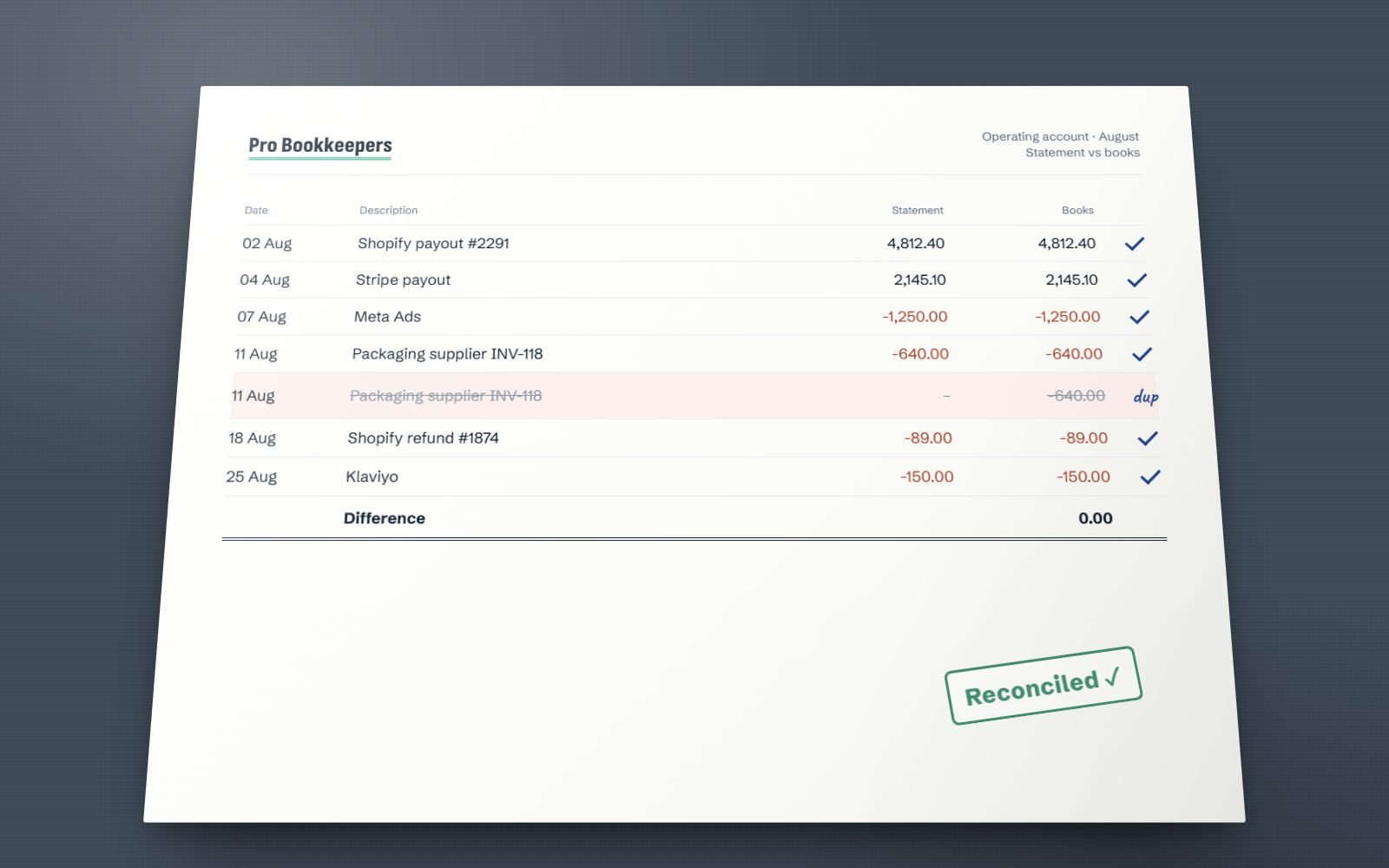
An empty Reconcile tab is not the same as reconciled books. Each transaction is matched to the bank statement, duplicates are found and removed, and the difference is 0.00 before the month closes.
Concrete work inside the file, not a list of adjectives. Scope depends on your plan and is agreed in writing before anything starts.
Every bank, card, loan and payment-processor account cleared in the Reconcile tab, then checked against the Bank Reconciliation Summary and the real closing balance on your statement.
Narrow rules that match on payee plus a second condition, documented so you know what each one does, and reviewed at every close against what actually fired that month.
Bills and receipts published into Xero with the source PDF sitting on the transaction, so year-end is a review rather than an email search. Dext instead if your volume justifies it.
Sales invoices raised and sent, recurring billing moved onto repeating invoice templates, supplier bills entered with correct due dates and payments applied so aged reports stay honest.
Account codes and account types set so direct costs and overheads sit where they belong, and your two tracking categories chosen against the reports you actually read.
Balance sheet accounts reconciled and scheduled, depreciation posted from the fixed asset register, suspense cleared, reports issued, and the period locked so it stops changing.
Xero's Reconcile tab is genuinely the best screen in small-business accounting. Each imported statement line sits on the left, Xero's proposed match sits on the right, and you either confirm it or correct it. It is fast, it is visual, and it keeps a file current in minutes a day instead of a panic at quarter end.
The trap is what an empty tab means. Zero items to reconcile only tells you that every line Xero received has been dealt with. If the feed stopped for seven days in April, those lines never arrived, so nothing appears to warn you. The file looks finished and is missing a week of spending.
So the empty tab is never our evidence. We tie the Bank Reconciliation Summary to the closing balance on the actual statement, every account, every month, and import a statement file wherever a feed has a hole.
Bank rules cut both ways. A rule that matches on one common word, or on a supplier who sells you both stock and office furniture, will push months of transactions into the wrong account while clearing itself neatly. We write rules narrow, document what each one does, and review what actually fired before every close.
Every account in Xero carries a code and, more importantly, an account type. The type is what decides where the line lands in your reports: revenue, direct costs, overheads, current asset, non-current liability. Get the type wrong and the account still works, the file still balances, and your reports quietly lie.
The classic version is direct costs sitting in overheads. Your profit is right, your gross margin is not, and the one number a business actually steers by becomes meaningless. We walk the whole chart at onboarding: types corrected, default tax rates set per account so nobody has to remember them, unused accounts archived, and duplicate codes merged.
Tracking categories then layer the dimension on top — location, department, revenue stream. Because Xero only gives you two, that choice gets made deliberately with you, not by whoever set the file up in a hurry three years ago.
Xero allows two active tracking categories per organisation, up to 100 options each. That is a hard limit, and it is the decision people regret most.
Each of these is already in your subscription or a click away. Left unused, each one becomes a monthly manual job or a year-end argument.
Recurring revenue does not need re-typing. We build repeating templates on the right schedule, set them to approve and send automatically where that is safe and to save as draft where a human should look first. Repeating bills do the same for rent, subscriptions and retainers, so nothing is missed and nothing is paid twice.
Assets get drafted from the purchase, given a type, a cost and a depreciation method, then registered. Xero runs depreciation on rollover and posts the journals for you. Disposals are handled in the register rather than as a manual journal someone guesses at, so the gain or loss is right and the schedule supports the balance sheet.
An Adviser-only tool that recodes account, tax rate or tracking across many transactions at once. It turns hundreds of manual edits into one reviewed run, which keeps cleanup hours down. It will not touch a locked period, not every transaction type is eligible, and every run is logged — so we test on a narrow batch, check the P&L effect, then apply.
Xero has two: one that stops everyone except advisers, and one that stops advisers too. After each close we set the lock so the month you approved cannot be edited behind you. Reopening a locked period is a deliberate act with a reason attached, which is exactly how prior-period adjustments should work.
Available on Xero's higher plans. Rates update daily, and Xero posts realised gains and losses as foreign invoices are settled. The part that gets skipped is period-end revaluation of outstanding foreign balances, which is what keeps your debtors, creditors and bank in your own currency honest. Where your file needs it, we scope it into your proposal and run it as part of the close.
Included with most paid Xero plans. It reads the key fields off a bill, can fetch statements from some suppliers on its own, and publishes into Xero with the source document attached to the transaction. That attachment is the whole point: a year-end where every bill has its PDF on it is a different job from one that starts in your inbox.
Where Xero is genuinely weaker. Built-in inventory tracks quantities and average cost and stops there: no landed cost allocation, no assemblies or bill of materials, no batch or serial tracking, no multi-warehouse. If you import stock or manufacture anything, you need a dedicated system feeding Xero, and we will tell you that at the quoting stage rather than adjust a wrong margin every month. The two-tracking-category ceiling is the other hard limit. Xero also renames and re-tiers its plans by country, so we check what your subscription actually includes instead of assuming.
We aim to have your file live within five working days of approval. A file needing cleanup takes longer, and we say how long before you commit.
Invite us as a read-only user. We check the Bank Reconciliation Summary, the rules, the chart of accounts and the unreconciled backlog, then tell you what is actually wrong.
One page: monthly scope and fee, the cleanup cost if the file needs one, and the date your first close lands. Nothing starts before you approve it.
You upgrade our user to Adviser. We repair bank feeds, rewrite the rules, fix account types, agree your two tracking categories and connect Hubdoc.
Reconciliation at least monthly, a close by the 10th, reports issued (with written commentary from Growth), and a lock date set so the month you signed off on stays signed off.
Fixed monthly if your bookkeeping is steady. Hourly or a dedicated resource if the workload varies or you want a named person in your file for set hours. Both models are priced the same way for Xero as for any other system.
Sole traders and early-stage businesses on a single Xero organisation.
Established businesses using tracking categories and real monthly reporting.
Multi-entity, multi-currency or e-commerce organisations needing real control.
On Xero, every plan includes bank rules we write and review, and a lock date set after each close. Hubdoc publishing comes with accounts payable from Growth. Prefer to buy hours? A bookkeeper is $14/hr or $1,650/month full-time, a senior bookkeeper $20/hr or $2,400/month, and an ACCA-qualified accountant $28/hr or $3,600/month. Xero cleanup is always quoted separately as a one-off fixed fee. See the full pricing table.
Offshore bookkeeping only works if the access model is boringly safe. Here is ours, in Xero terms.
We do not ask for online banking credentials, and you should refuse any bookkeeper who does. Xero bank feeds are authorised by you, directly with your bank, and can be revoked by you the same way.
The Xero organisation stays in your name on your card. We are an invited user with the Adviser role, every action is stamped with our name in History and Notes, and removing the user ends our access instantly.
Full export any time you ask, no exit fee and no notice games. If you leave, we walk your next bookkeeper through the rules, the chart of accounts and the lock dates so the handover is clean.
We run client files in both every day. Where Xero's reconcile screen and bank rules genuinely win, where QuickBooks pulls ahead, and how to choose without switching twice.
Read the comparisonThe checklist we work through before any set of accounts is signed off, including the balance sheet reconciliations most Xero users skip entirely.
Read the checklistThe order to rebuild a backlog in, what to do when bank feeds only reach back 90 days, and how to tell when a catch-up is genuinely finished.
Read the guideThe errors that turn up most often in small-business files, several of which Xero will let you make without a single warning message.
Read the articleScope depends on your plan. On Growth and above, work runs through the month rather than in a burst at month-end: we reconcile the bank, card and payment-processor accounts in the Reconcile tab, code what the bank rules did not, chase the transactions nobody can identify, publish bills and receipts from Hubdoc with the source document attached, raise and send sales invoices, enter supplier bills with correct due dates, and apply payments against them so the aged reports stay real. Essentials reconciles monthly and does not include Hubdoc, invoicing or bills.
At month-end we run the close: reconcile every balance sheet account rather than just the bank, check the Bank Reconciliation Summary against the real statement balance, clear the suspense and clearing accounts, review the tracking-category split for unassigned items, and produce the profit and loss and balance sheet. Depreciation from the fixed asset register and multi-currency revaluation are scoped into your proposal where your file needs them. An ACCA-qualified accountant reviews the close before it reaches you. Then we set the lock date so the month stops moving. From Growth, the reports come with a short note on what changed and why.
You keep it, in your own name, paid on your own card. That is deliberate. A bookkeeper who owns your subscription owns your leverage, and moving away from them turns into a negotiation instead of a click.
You invite us as a user in your organisation and we work with the Adviser role, which is what unlocks the tools this job needs: Find and recode, lock dates, manual journals, the chart of accounts and the fixed asset register. Every action we take is stamped with our user name in the History and Notes of each transaction, so you can audit anything we did at any time without asking us for permission.
If you ever want us gone, you remove the user and the access ends that second. Nothing is held hostage, there is no exit fee, and we will talk your next bookkeeper through the file so the handover is clean.
This is the most expensive misunderstanding in Xero. When the Reconcile tab shows zero items to reconcile, it means every statement line Xero received has been matched or coded. It does not mean the bank account is correct.
If the feed dropped for seven days in April, those lines never arrived, so there is nothing sitting in the tab to warn you, and the file looks finished while it is missing a week of spending. The real control is the Bank Reconciliation Summary report, which compares the statement balance Xero holds against the balance in your Xero account, plus any unreconciled items.
We tie that to the closing balance on the actual PDF statement every month, for every account. Where a feed has gaps we import a statement file to fill them. Zero items in the tab is a cleared inbox, not a reconciliation, and treating one as the other is how a file balances while being wrong.
Yes. On a file that has drifted, cleanup comes first, before any monthly work. A file that needs cleanup usually shows months of transactions coded to a single catch-all expense account by an over-broad bank rule, a bank account whose Xero balance no longer matches the statement, hundreds of unreconciled lines going back a year, duplicated contacts, invoices marked paid against the wrong payment, and a suspense account nobody has opened since the last accountant left.
We work backwards from the last month you trust. Each period is reconciled properly against real statements, miscoded history is fixed in bulk with Find and recode rather than one transaction at a time, duplicate contacts are merged, and the balance sheet accounts are each supported by a schedule. You get a written list of what was wrong and what it changed.
Cleanup is quoted as a one-off fixed fee, separate from the monthly work, so you can see exactly what the backlog costs before committing. Our guide to catching up 12 months of bookkeeping walks through the same order we use.
Two active categories per organisation, each holding up to 100 options. That ceiling is fixed and it is the single most important design decision in a Xero file, because it is the one people discover too late.
If you use your two on Location and Salesperson, you cannot later add Department without giving one of them up, and the history coded to the retired category stops reporting the way it used to. So we choose them deliberately, against the reports you actually need, before anything is coded.
If you need a third dimension, there are honest options rather than pretending the limit does not exist. Job-level or client-level profitability usually belongs in Xero Projects, not a tracking category. A coarse split such as trading entity or revenue stream is often better handled in the chart of accounts with separate income and direct cost codes. And if you genuinely need three or more dimensions across large volumes, that is a reporting add-on, and we will say so rather than contort the file.
We use them heavily, and yes, they cause real damage when they are written lazily. A bank rule matches on conditions such as the payee, a text fragment in the reference or an amount range, then proposes or applies a coding.
The danger is breadth. A rule that fires on any line containing the word payment, or on a supplier who sells you both stock and office furniture, will quietly push months of transactions into the wrong account, and because the lines clear themselves the file looks healthy the whole time.
Our approach is narrow rules that must match on payee plus a second condition, no rule that spans both direct costs and overheads, and no silent auto-apply on anything that affects gross margin. Rules are reviewed at each close against what actually fired that month, and retired when a supplier changes their bank narrative. Automation is only worth having when somebody is checking what it did.
Hubdoc is included with most paid Xero subscriptions, so for a lot of small businesses it is the sensible default: nothing extra to pay, it reads the key fields off a bill or receipt, it can log into some suppliers and fetch statements itself, and it publishes into Xero with the source document attached to the transaction. That attachment is the part that matters. A year-end where every bill has its PDF on the transaction is a different experience from one that starts with searching your email.
Dext costs more and generally earns it on volume and awkward documents: better extraction on poor-quality photos and long itemised receipts, stronger supplier rules, line-item detail, and a smoother approval workflow when several people submit expenses.
Our rule of thumb is that Hubdoc is fine until the volume or the document quality starts costing us time, and at that point the subscription is cheaper than the hours. We work in both and we will tell you which one your file needs.
Yes. Xero has a tool called Find and recode, available only to users with the Adviser role. You search the file for transactions matching a condition, such as everything coded to General Expenses between January and June, review the list, and then recode the account, the tax rate or the tracking category across all of them at once. What used to be four hundred manual edits becomes one reviewed run, which keeps cleanup hours down.
There are real limits and we work inside them. It cannot touch a period that is closed by a lock date, so the lock has to be moved deliberately and put back afterwards. Not every transaction type is eligible. And every run is written to the Find and recode history, which is exactly why we always run a narrow test batch, check the effect on the profit and loss, and only then apply the full recode.
Often not, and this is where we will talk you out of Xero alone. Xero's inventory is deliberately simple. It tracks quantities and values for inventory items, values them on average cost, and posts cost of goods sold when you sell them. For a business holding a modest range of finished goods bought in and sold on, that is genuinely enough.
It stops being enough quickly. There is no landed cost allocation, so freight, duty and import charges do not get pushed into the unit cost of the stock they belong to, and your gross margin is overstated until someone adjusts it manually. There is no manufacturing or assembly, no bill of materials, no batch or serial tracking, and no multi-warehouse stock control.
If any of that describes you, the answer is a dedicated inventory system such as Unleashed, Cin7 or Katana feeding Xero, with Xero doing what it is good at. We would rather say that at the quoting stage than fix a wrong margin every month.
No. We do not file tax returns of any kind and we do not audit, and we would rather be blunt about that than take the work and disappoint you.
What we do is prepare the file so filing is a short job for whoever is authorised to do it. That means every transaction carries the right tax rate rather than a default, the tax accounts on the balance sheet reconcile to the amounts actually owed, the periods are locked so the numbers cannot shift after they have been reported, and any prior-period adjustment is documented rather than quietly absorbed. For UK businesses, it means the VAT return figures are already in Xero, ready for your agent to submit to HMRC under Making Tax Digital.
Your accountant, agent or CPA then reviews and submits from a file that supports itself. A file that already reconciles gives your tax professional less to rebuild before they can file.
Invite us as a read-only user for twenty minutes. We will check the reconciliation summary, the rules and the chart of accounts, and give you a straight answer plus a fixed number to fix it. If the file is already in good shape, we will tell you that too.
An ACCA-qualified accountant replies within one business day.
The full form asks for your country, your software and how far behind the books are, so the call starts informed.
Open the full form →